Get Products Recommended in ChatGPT Shopping
Learn how product feeds, accurate catalog data, accessible product pages, reviews, and third-party evidence affect ChatGPT Shopping visibility.
By Jonathan LiemPublished Updated

Imagine someone asks ChatGPT:
I need a carry-on suitcase under $250 that fits most US airline limits, has replaceable wheels, and can arrive before Friday.
A product page that says “premium luggage for modern travelers” is almost useless here. A page that lists the dimensions, price, wheel warranty, delivery estimate, weight, and return policy gives ChatGPT something it can compare.
That is the real job. You are not trying to sprinkle AI keywords across a product page. You are making it easy for a shopping assistant to answer a specific buyer’s question accurately.
Here is a seven-step workflow worth using.
1. Start by Making Sure Your Products Are Eligible
Start with the catalog, not the copy.
OpenAI’s product-feed specification separates eligibility for search from eligibility for checkout. A product can be available for discovery without in-chat checkout. Checkout eligibility, however, requires search eligibility.
For each product and variant, check:
- stable product and variant IDs;
- a working canonical URL;
- current price, currency, and availability;
- accurate title, brand, images, and description;
- size, color, material, dimensions, or other attributes buyers use;
- correct search and checkout eligibility settings.
OpenAI says Shopify Catalog is already integrated for individual Shopify merchants. Other eligible merchants can apply to send a direct feed. Either way, the information still needs to be current.
Useful test: Pick five bestsellers and compare the feed record with the live page. If the price, availability, title, or variant details disagree, fix that before publishing another guide.
2. Write for the Decision, Not the Category
Most weak descriptions name the category and add adjectives:
A premium, innovative trail shoe built for performance.
A useful description helps someone decide. This is a fictional example:
A waterproof trail shoe for wet, uneven routes. The 6 mm lugs add grip on mud and loose ground. At 320 g per shoe, it is heavier than our road model.
The second version tells the buyer:
- who the product is for;
- where it works;
- what can be measured;
- what trade-off to expect.
Write down the five questions a customer asks before buying. If the page does not answer them in plain language, the description is not finished.
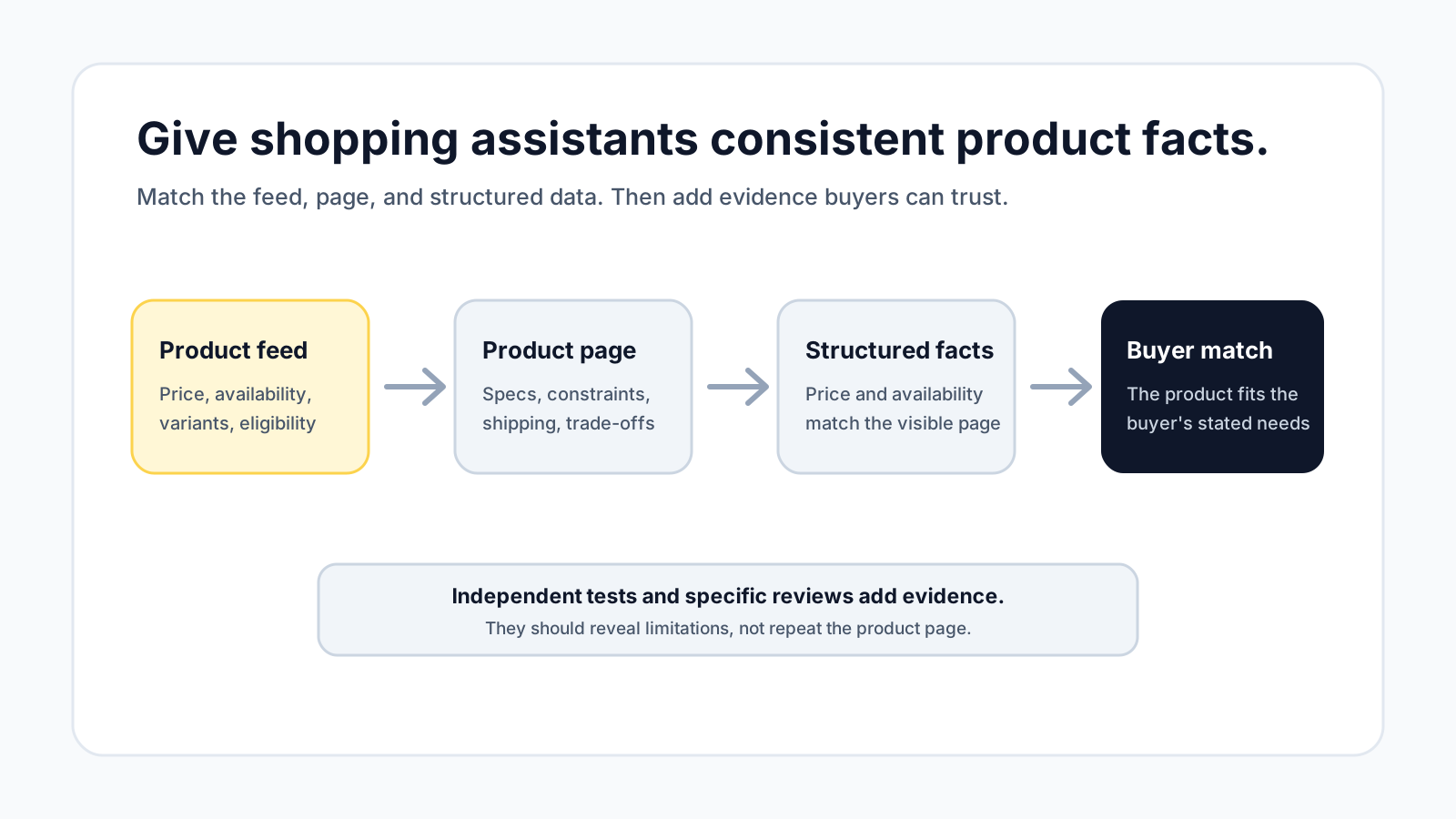
3. Keep the Feed, Page, and Structured Data in Agreement
Conflicting facts make a product difficult to trust. If the feed says “in stock,” the page says “ships in six weeks,” and the structured data carries last month’s price, a shopping assistant has to choose between bad options.
Check these fields together:
| Buyer fact | Product feed | Visible page | Structured data |
|---|---|---|---|
| Name and brand | Yes | Yes | Yes |
| Price and currency | Yes | Yes | Yes |
| Availability | Yes | Yes | Yes |
| Variant attributes | Yes | Yes | Yes |
| Shipping and returns | When supported | Yes | When supported |
| Ratings | When supported | Yes | Only when visible |
Google’s merchant-listing documentation is not an OpenAI ranking guide. It is still a useful reference for clean Product and Offer markup.
Do not place claims, ratings, or prices in structured data that a shopper cannot verify on the page.
4. Answer the Constraints People Add in Conversation
Shopping questions become specific quickly:
- “under $250”;
- “safe for sensitive skin”;
- “works with an iPhone”;
- “small enough for a studio apartment”;
- “available before Friday”;
- “easy to return if it does not fit.”
OpenAI’s shopping research guide explains that ChatGPT may ask follow-up questions about budget, size, comfort, performance, and other trade-offs.
Your product page should answer the constraints that decide whether the item belongs in the final shortlist:
- Who is it for?
- What is it compatible with?
- What conditions is it designed for?
- What are its dimensions and materials?
- What does it do better than the nearest alternative?
- What does it not do?
- What are the shipping, return, and warranty terms?
This is more useful to a human buyer too. That is a good sign.
5. Treat Reviews as Evidence
“Great product, five stars” does not explain much. A useful review describes the situation, result, and trade-off:
I used this on a four-day trip. It fit in the overhead bin, but the front pocket was tight once the main compartment was full.
Reviews like that help a buyer understand where the product works and where it does not. They can also reveal facts that should be added to the product page or FAQ.
Do not hide repeated complaints. If customers keep mentioning difficult assembly, sizing problems, or slow shipping, address the issue and make the limitation clear.
OpenAI notes that review summaries may draw from public websites and are not independently verified by OpenAI. Consistent evidence across your page and independent sources is therefore more credible than a large pile of vague testimonials.
6. Earn Independent Coverage
Your own page can explain the product. It cannot independently prove every claim.
Look at the sources buyers already trust in your category:
- specialist reviewers;
- comparison sites;
- buyer communities;
- professional associations;
- retailers with detailed customer feedback;
- creators who test products under real conditions.
The goal is not to manufacture mentions. Give credible reviewers accurate specifications, a product they can test, and the freedom to discuss limitations. One detailed, relevant evaluation is more useful than ten generic directory listings.
7. Test Real Shopping Questions
Do not measure progress by asking only for your brand.
Create a small set of questions that reflect real buying decisions:
- best carry-on under $250 with replaceable wheels;
- waterproof trail shoe for wide feet;
- standing desk for a small room under 48 inches wide;
- fragrance-free moisturizer for dry, sensitive skin.
For each question, record:
- whether the product appears;
- which products appear instead;
- what attributes the answer emphasizes;
- which pages or sources are cited;
- whether the stated price and availability are correct;
- the date, platform, and wording used.
Repeat the same questions after meaningful catalog or page changes. Answers can vary, so look for a pattern rather than celebrating one appearance.
The same discipline applies beyond shopping. This AI visibility gap audit explains how to compare repeated answers without mistaking one result for a trend.
A 30-Minute Merchant Check
If you only have half an hour, do this:
- Choose one bestseller and one important variant.
- Compare price and availability across the feed, page, and markup.
- Ask a shopping question that includes budget, use case, and one constraint.
- Note which competing products appear and why they fit the request.
- Add the missing decision facts to your page.
- Repeat the same test after the change has had time to be discovered.
The useful question is not “How do I rank first?” It is “Why would this product be a trustworthy answer to this buyer’s request?”
Frequently Asked Questions
Can I pay to rank first in ChatGPT Shopping?
No. OpenAI says organic product results are selected independently and are separate from ads. A merchant can improve product data and eligibility, but cannot buy a guaranteed first organic recommendation.
Does Product schema guarantee that ChatGPT will recommend my product?
No. Structured product data makes facts easier to understand, but relevance, shopper context, availability, price, third-party information, policies, and other factors can affect the result.
Do Shopify merchants need to submit a separate OpenAI product feed?
OpenAI currently says Shopify Catalog is already integrated and that no additional work is required from individual Shopify merchants for that catalog connection. Merchants should still keep Shopify product data accurate and current.
Does Instant Checkout improve product ranking?
OpenAI says Instant Checkout does not give a product preference in the initial organic results. Checkout availability may be considered when several merchants sell the same product.
How long does it take for a product-data change to appear?
There is no universal refresh time. OpenAI notes that price and shipping updates can be delayed. Record the change date and monitor the same shopping questions before and after the update.
Should every product get its own page?
Each distinct product should have a stable detail page. Variants can share a product family page when the page and structured data make each purchasable variant unambiguous.
Get a Clear Read on Your AI Visibility
If you want to know what AI systems can understand about your site—and where competitors are being chosen instead—start with Inflect’s free AI visibility audit.